Speak a lil chinese for ´em, Derek
I have always been interested in speaking foreign languages, and with time I got quite proficient in some of them, mostly of the southeuropeans (Italian, Portuguese, some Spanish, some French).
During the 2020 mandated time indoors I got interested in learning Mandarin; it was not the first time I dabbed with non romantic languages (i also tried Arabic, with very little success) but this was the first time I approached something so alien.
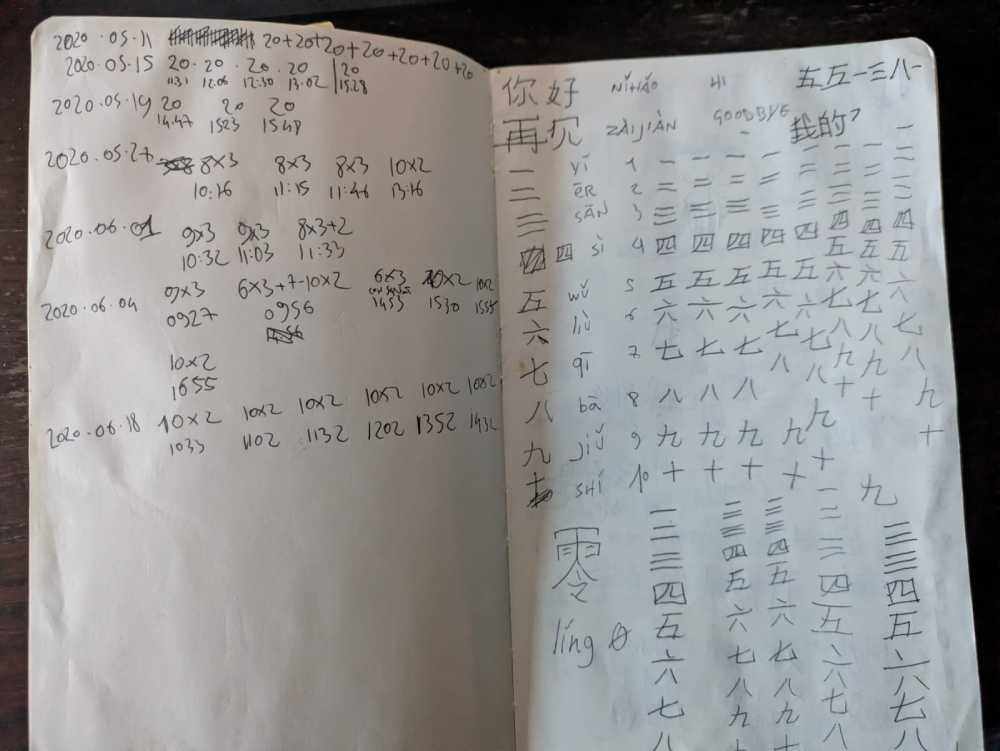
My first Chinese studies
My very first Chinese studies next to my daily pushup logs, summer 2020
As per usual I refused to do the simple thing and just follow a paid course, opting instead for digging myself in deeper levels of self punishment.
Like many other language self-students, the very first method I tried was Duolingo; I previously used this app to try and learn some Welsh before moving to Wales, and just like that time this very gamified learning process turned out to be a waste of time: the way DuoLingo works, you end up getting extremely good at remembering to do your daily check-in (thanks to the continuous notifications), cramming lessons and points and keeping your streak alive for months; as soon as you take a break, your memory will be wiped out and you will barely remember how to spell basic sentences.
I don’t think the problem lays in the app itself, nor in their spaced repetition process (more on that later on), rather on the style of teaching and the content of the lessons - maybe a pro account would help? I should experiment and see if the app has improved with time (lmao).
I quickly got burned out by Duolingo streak maintenance and reapproached chinese self study only a year later, this time by downloading what is a frequency list. I found a PDF with the 5000 most used characters in the Chinese language and began studying them one by one, bruteforcing the language bit by bit.
I would invest my lunch break at work writing each character on paper multiple times, so that it gets impressed in memory:
This method did nothing for my language proficiency, 5000 characters are a lot and in Chinese specifically it makes little sense to study them isolated from context.
The silver lining is that daily writing taught me the proper stroke order to use when drawing the different lines that compose ideograms.
I often use these rules to draw characters i need to search on chinese digital dictionaries such as Pleco.
I think i gave up chinese for a bit again, due to frustration, only to feel guilty for not having pushed hard enough on something challenging and so I bought some physical books to teach myself the language.
The method used in these types of books is identical to that of high schools, there are different chapters introducing specific parts of the grammar, followed by some written exercises, followed by some vapid dialogue you have to listen and repeat. I think i barely completed two lessons from each book before abandoning them on a shelf together with their useless complementary CDs.
I then gave up writing chinese completely and tried another app, HelloChinese. It works exactly like DuoLingo but, for some extra money, it would provide me with extra content to listen to and read. It works by using the usual daily streak trick plus boring lessons that lead me to very limited improvements followed by total memory erasure as soon as i took a break; months of no study followed due to frustration, aggravated by the extra cost for the in-app purchases.
Feeling guilty once more for not having pushed myself hard enough, I took on daily running and used the opportunity to do some language study: I remembered having studied some Arabic using the Michel Thomas method and tried using it with Chinese; the way this method works, you participate in a recorded group lesson where a teacher interacts with students, gradually increasing the cognitive load and the percentage of foreign language to English language ratio until one becomes fluent in basic conversation. I studied the tapes for about 6 months, but as I progressed I noticed that remembering the early lessons content got more and more difficult as new terms and sentences were introduced; the mixed reviews I subsequently read on both the method and mr Thomas himself got me to abandon once more.
In the following years, mainly due to love for this interesting language and millenary culture, I went back to studying on and off, pushing myself to try and find a more gentle way to study and trying to integrate the interesting concepts of Input Hypothesis and Comprehensible Input in particular. I would try to integrate Chinese sentences and content that I could understand quite easily, with the addition of very slightly more advanced concepts; this helps manage frustration and introduces complexity in a gentle way, in the same vein of how children learn the basis of language from adults around them.
In the same timeframe I rediscovered my passion for spaced repetition flashcard studying.
Imagine a stack of cards, you would pick up the very first one and read a chinese sentence written on it, such as “你好”. This is your question side of the card, and you have to try to remember the answer, the meaning to this sentence. You then reveal the english translation written on the other side of the card and read it aloud: “nǐhǎo: hello, hi”
The way spaced repetition works, you sort these cards in different stashes based on how easily you could correctly remember their answers; the harder they are to remember the more often you’d pick them up, repeating the question/answer process until they stick to your memory; they’re then moved to stashes you check less often, so that you don’t burn yourself off cramming too much stuff in your memory.
This process is made particularly easy by using AnkiDroid, a free and open source android app. It’s used by many law and medicine students to memorize many concepts in a short time, and you can find pre-packaged decks of flashcards to study different subjects, many featuring images and audio to help you with your studying.
AnkiDroid shows you the flashcard question and a button to show the other side with the answer; when the answer is shown you need to grade how well you remembered the card with one of the 4 buttons at the bottom; this grading helps the app decide how often to present you this card in the future, the harder it was to remember the sooner.
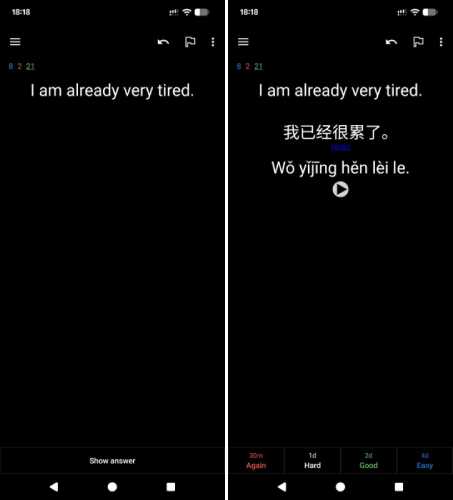
Processing flashcards in AnkiDroid
Trying to remember the Chinese translation of a sentence and then grading how well i remembered it
My rules for grading flashcards mostly boil down to:
- Again: wrong or blank answer
- Hard: could remember some, or could remember sound but not ideogram shapes
- Good: could remember sound and ideograms very easily
- Easy: never used, only to bury cards that are extremely easy
The Anki deck I ended up using more frequently is called “Spoonfed Chinese”, which is a collection of common use sentences ordered by word frequency; it follows the i+1 structure that sits at the core of the Input Hypothesis and introduces complex grammar structures in a very graceful way. Every card has an audio file so you can hear the (sometimes very regional) pronounciation of the words that you see on screen, which makes it more memorable.
Here’s an example of how a studying session with flashcards work with a deck like Spoonfed Chinese, notice how sentence progressively get more complex and more nuanced aspects of grammar are slowly introduced:
I got so interested with this method of studying that I bought myself a tiny bluetooth controller the size of a keychain and I configured AnkiDroid to use it for flashcard grading. The way i set it up I linked each button to the 4 answer grading buttons in Ankidroid (Y: Again; B: Hard; A: Good; X: Easy):
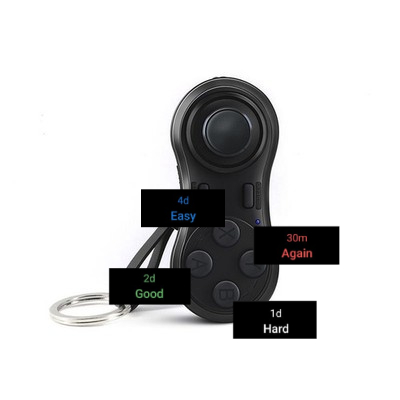
Bluetooth joypad for Ankidroid
Keychain-sized bluetooth joypad to control AnkiDroid
This made it very easy to quickly process many flashcards everyday during my daily commute:
- press any button and you hear the sound bite of the question side
- think of the answer
- press any button to hear the answer
- grade your answer from 0 to 3
I have lost two of these stupid bluetooth controllers and I think I’m done buying them; I recreated this setup by configuring screen wipes on AnkiDroid as controller actions, recreating my buttons clockwise config:
- Swipe left: Again
- Swipe Up: Hard
- Swipe right: Good
- Swipe down: Easy
Doing flashcards consistently means having about 15 minutes of studying 5-7 days a week, it’s not stressfull and can be done during the day (for example everytime I’d feel like wasting time doom scrolling).
Whenever I encounter some pieces of grammar that are particularly difficult to understand and integrate I paste the chinese sentence into an LLM and ask it to explain it to me:
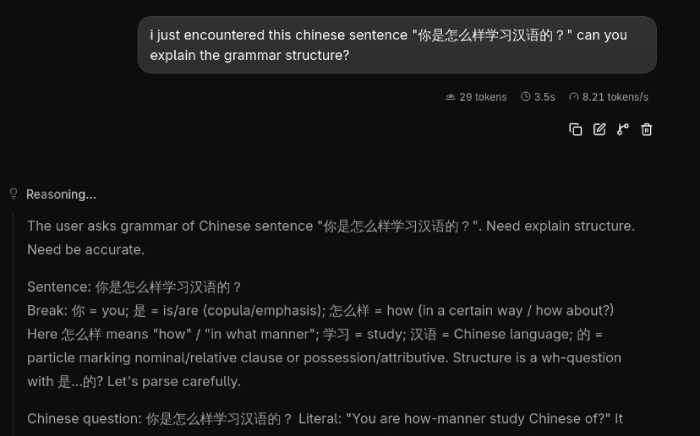
Using AI to study
I often ask AI to help me understand complex grammar
I think that language learning is an excellent use case for AI, LLMs can be the most patient teachers you’ll ever have and they have been trained on both the entire corpus of Chinese language AND lessons of all levels from elementary to very advanced.
I have setup my own LLM to role-play everyday situations (such as ordering food, shopping, asking for directions) and this has helped me remember specific language patterns more easily: i created different scripts, one for each real life situation, and I can approach the scenario from different angles to sharpen my skills:
System: You are a Chinese restaurant waitress helping a beginner learn Mandarin. Roleplay naturally in character, using only simple HSK 1 vocabulary and short sentences. Include pinyin and a brief English translation after each line.
LLM: 欢迎光临!请问几位? (Huānyíng guānglín! Qǐngwèn jǐ wèi?)
LLM: Welcome! How many people?
User: 一位
LLM: 好的,这边请!这是菜单。请问你想喝点什么? (Hǎo de, zhèbiān qǐng! Zhè shì càidān. Qǐngwèn nǐ xiǎng hē diǎn shénme?)
LLM: Okay, this way please! Here is the menu. What would you like to drink?
User:
Another app I use often when studying chinese is Pleco, a dictionary that allows you to search for words by translation, pinyin transliteration and even drawing ideograms on the screen. Pleco is very useful because you can check the meaning of each ideogram involved in the word you searched, and it also features sentences related to your query. Pleco features some internal flashcard system but I find it easier to copy the dictionary entry into AnkiDroid and make my own flashcards on the fly.
The desktop equivalent I prefer using when I’m on my laptop is the glorious MDBG dictionary, a real gem that is unexplicably fast, usable and free. I like that it integrates drawing ideogram search, audio recordings and sample sentences from vetted sources.
The tool I’m experimenting with to correct my terrible Chinese pronounciation is a web based software I built a few days ago, called it PIDOUDAHUI 批斗大会. You speak Chinese into your microphone, and whatever you said is written on the screen in huge chinese characters thanks to an internal speech-to-text engine. This Takahashi method of highlighting mistakes triggers one’s own sense of embarassment and sense of discomfort. The user than has to continue the humiliation ritual by grading the transcription as wrong or correct, further highlighting the mistakes:
This is a tongue in cheek tool written mainly to highlight my frustrations with a beautiful, yet extremely complex language, but I think that it has improved my pronounciation substantially: by having to repeat oneself over and over until the machine gets it correctly, one begins to overly enunciate words and use the correct tones.
If you want to play with the source you can clone the repo and mod it yourself, should you find it useful give me some feedback thanks.
See you next full moon!